Sepia Labs
SMS Program
Last updated: 29 September 2026
This page describes the Sepia Labs SMS program in full: who sends the messages, what they contain, exactly how a person opts in, and how to stop. It exists so that anyone — a recipient, a carrier, or a reviewer — can verify the program without an account.
1. Who sends, and what
Messages are sent by Sepia Labs LLC, the company behind the Sepia business platform. The program is low-volume, transactional and account-related: booking and appointment confirmations, event RSVP confirmations and reminders, account and service notifications, billing and payment updates, customer-support replies, and individually requested follow-ups. We do not send marketing blasts under this campaign, we do not use purchased lists, and we do not send unsolicited messages.
Real examples of what a recipient receives:
Sepia Labs: Your onboarding call is confirmed for [date] at [time]. Reply HELP for assistance or STOP to opt out.
Sepia Labs: Reminder — your appointment is tomorrow at [time]. Reply STOP to opt out.
2. How people opt in
Opt-in happens on our web forms, at the moment a person provides their phone number — creating an account, confirming a booking, RSVP'ing to an event, or submitting a contact form. Every one of those forms displays this consent language, verbatim, directly beside the phone field:
The recreation above matches the live forms word for word — the sentence is generated from a single source in our codebase and covered by automated tests, so it cannot drift page by page. Phone numbers are never required to browse, and consent is never a condition of purchase.
A person who previously opted out can re-subscribe at any time by texting START. That keyword is a re-subscription mechanism, not the primary opt-in — the primary opt-in is always the web form above.
3. Frequency, rates, stopping
Message frequency varies with account activity; most recipients receive only the confirmations and reminders tied to things they booked or requested. Message and data rates may apply — they are charged by your carrier, not by us. Reply STOP at any time to opt out immediately and permanently; reply HELP for help, or email info@sepialabs.ai. Opt-outs are honoured across every list, without exception.
4. Privacy
Phone numbers and opt-in records are used to operate this program and are not shared with third parties for their marketing. Full details are in the Privacy Policy and the SMS Terms.
5. Account notifications from Sepia Labs
Separately from the messages above, Sepia Labs LLC texts the people who run a Sepia workspace about their own Sepia account, from our toll-free number (855) 629-9802. These texts are optional and stay off until the account holder turns them on. We send these three messages and nothing else — no marketing, no promotions:
Sepia Labs: You're signed up for account alerts (setup + billing). Msg frequency varies. Msg & data rates may apply. Reply HELP for help, STOP to opt out.
The opt-in confirmation — once, right after texts are turned on.
Sepia Labs: Your workspace setup isn't finished. Pick up where you left off: https://sepialabs.ai/settings?section=account Reply STOP to opt out.
A setup reminder — at most once, two or more days after sign-up, only if workspace setup is unfinished.
Sepia Labs: The card for your Sepia subscription was declined. Update it: https://sepialabs.ai/settings?section=billing Reply STOP to opt out.
A declined-card alert — when a renewal payment for the workspace's Sepia subscription fails.
How account holders opt in
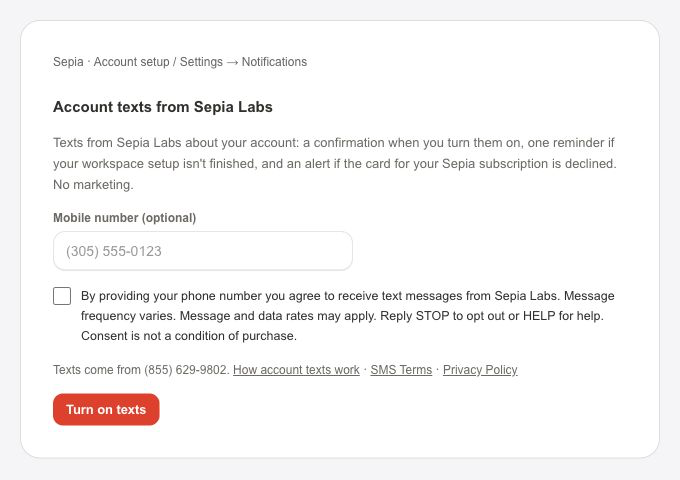
On a web form inside Sepia: the Texting step of account setup, or Settings → Notifications. The person enters a mobile number (the field is optional) and ticks an unticked box beside this exact language:
A screenshot of the live form is at sepialabs.ai/legal/sms-account-opt-in.png. Nothing is sent unless the box is ticked and the form is saved, and we keep a record of the words shown, the number, the time and the form it came from. Consent is not a condition of buying or using Sepia.
Frequency, rates, stopping, help
Message frequency varies: at most one confirmation, one setup reminder, and one alert per declined renewal. Message and data rates may apply. Reply STOP to (855) 629-9802 at any time to stop account texts, or reply HELP for help; you can also email info@sepialabs.ai. The number can be changed, or the texts turned off, in Settings → Notifications. Someone who replied STOP and wants account texts back can reply START — that only re-subscribes a number that already opted in; the primary opt-in is always the web form above.
6. Contact
Sepia Labs LLC
3211 NW 7th Ave Cir
Miami, FL 33127
info@sepialabs.ai