Get the useful answer first.
A clear sentence leads. Records, timelines and next steps appear when they help you work with the answer, with actions beside the thing they change.

Sepia Chat / ONE CONNECTED WORKSPACE
Catch up on the day, work on a draft and review the next action in the conversation. Open a document beside the thread. Move into the workspace and return without losing your place.
Start freeTHE POWER OF BOTH
Get help in the moment, then take as much control as the work needs. The client record, the project board and the calendar are all part of the same story.
THE CONVERSATION, REDESIGNED
A briefing, an editable draft and a reviewed plan. See how the answer becomes something you can work with.

Ask about your day, a client or the money coming in. Get a clear answer, with the relevant records and next steps together in the conversation.
Explore Chat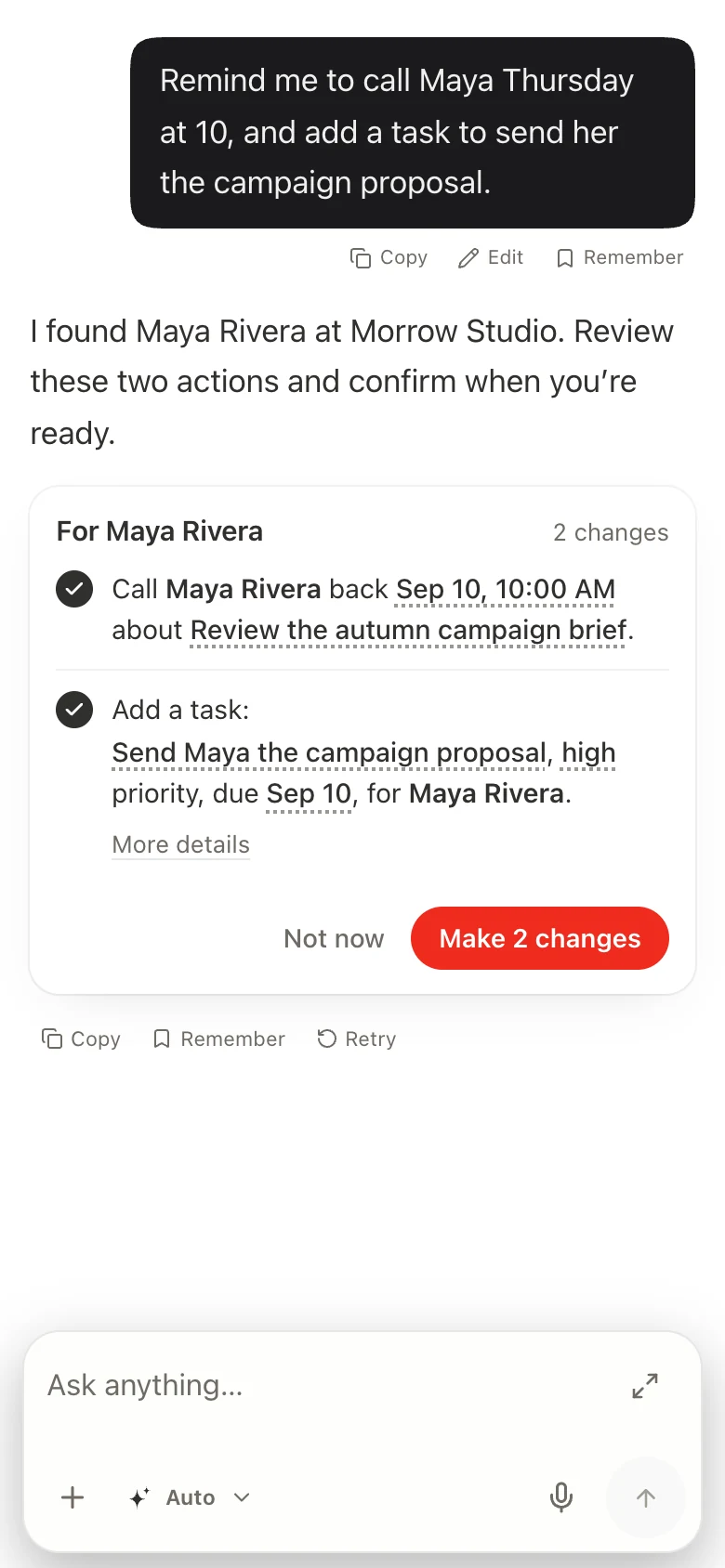
BETWEEN TAKES. BEFORE THE NEXT MEETING.
A client calls while you’re on location. There’s a proposal to send and a team waiting for direction. Keep that moment moving.
“Remind me to call Maya Thursday at 10, and add a task to send her the campaign proposal.” The request has the client and the work behind it.
Check the task, deadline and priority. Adjust the details and confirm when they’re right.
The result comes back to the thread. The task is there in Projects, ready for you and the team to work with directly.
CAPABILITY, CONNECTED
Conversation and direct control draw on the same workspace. Move between them as the work calls for it.
A clear sentence leads. Records, timelines and next steps appear when they help you work with the answer, with actions beside the thing they change.
Edit an invoice, develop a proposal or prepare an image in the conversation. Documents and files can open beside the thread, so the brief stays in view.
Check an editable confirmation or a plan of several actions. Adjust the details, dismiss the proposal or confirm it. A receipt tells you what completed.
Move to another page while Chat is working and return to the same conversation. Use saved memory and schedules when a piece of context or a repeated job should last beyond one chat.
YOU GET BOTH
One set of clients, projects and plans. Ask for the next move, get into the detail, then pick up the conversation. It all belongs to the same work.

BEFORE YOU BEGIN
No. They work together in one Sepia workspace. Ask about a client, project or plan in chat; open the workspace for direct control. Return to the conversation whenever it helps.
Chat prepares the supported action with details you can review. Edit, dismiss or confirm the proposal. Completed actions return to the conversation.
Create a workspace and bring in your contacts. Add the modules and communication connections you need. Calling, messaging and AI usage have their own usage charges; check the pricing for your workspace.
Sepia / WORK, CONNECTED
Start a conversation. Open the details.
Make the next move yours.